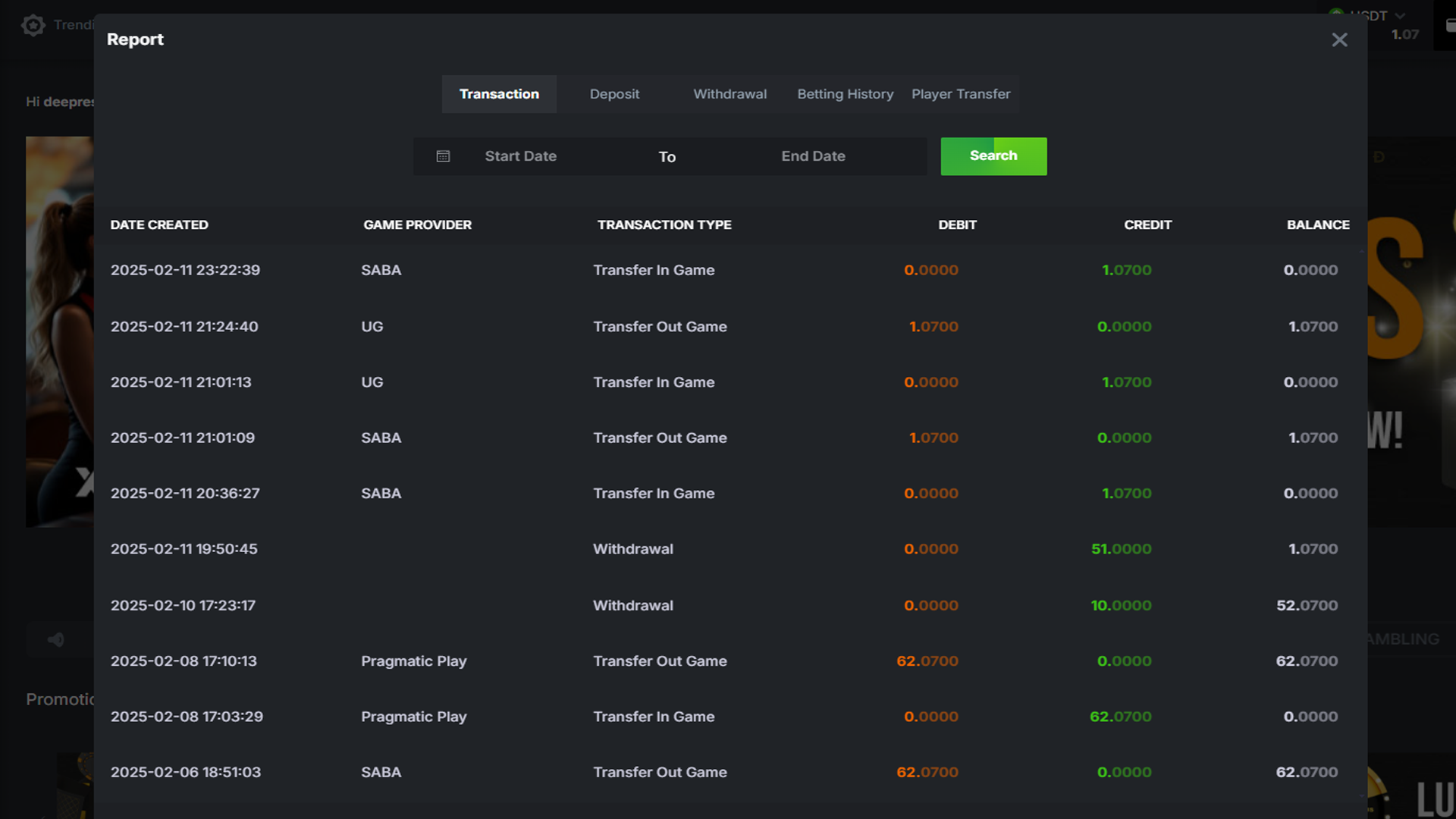
Transaction Report at XTRONBET
At XTRONBET, players can track their entire transaction activity through the easily accessible transaction report. This report provides a clear overview of all the activities that have occurred in the player's account, including transfers in and out between games, as well as the balance associated with each transaction. Below is how to use the transaction report feature and what you can learn from it.
1. What is a Transaction Report?
The Transaction Report is a feature at XTRONBET that allows players to view all transactions made during a specific period. This report includes transactions such as fund transfers between game accounts, deposits, and withdrawals. You can filter the report based on dates, transaction types, and more for more detailed information.
Information Found in the Transaction Report:
- Date Created: The date and time when the transaction was made.
- Game Provider: The game provider involved in the transaction (e.g., Pragmatic Play, SABA, UG).
- Transaction Type: The type of transaction, such as "Transfer In Game" or "Transfer Out Game".
- Debit: The amount of money debited in the transaction (shown as negative).
- Credit: The amount of money credited in the transaction (shown as positive).
- Balance: The balance after the transaction was made.
2. How to Access the Transaction Report
To view the transaction report, simply log in to your XTRONBET account and select the "Report" or "Transaction" option from the menu. From there, you can enter the desired time period, either based on start and end dates, and choose the type of transaction you want to view (e.g., "Deposit", "Withdrawal", or "Player Transfer").
Steps to Access the Transaction Report:
- Login to your XTRONBET account.
- Go to the "Report" or "Transaction" section in the dashboard.
- Use the filter to select the desired date range or specific transaction type.
- Click the "Search" button to display the relevant transaction report.
3. Example of a Transaction Report
Here are some example transactions recorded in your report:
- 2025-02-08 17:10:13 - Transfer Out Game - Debit: 62.0700 - Balance: 62.0700
- 2025-02-08 17:03:29 - Transfer In Game - Credit: 62.0700 - Balance: 0.0000
- 2025-02-06 18:51:03 - Transfer Out Game - Debit: 62.0700 - Balance: 62.0700
- 2025-02-06 13:34:15 - Transfer Out Game - Debit: 62.0700 - Balance: 62.0700
- 2025-02-06 13:33:39 - Transfer In Game - Credit: 62.0700 - Balance: 0.0000
4. Benefits of Understanding the Transaction Report
Through the transaction report, players can track and monitor their financial status on XTRONBET. You can see the flow of funds, verify the transactions that occurred, and ensure that every transfer or bet has been properly recorded. This is a very useful tool to ensure that your account balance is accurate and to gain further insight into your game activities.
Some Benefits of the Transaction Report:
- Check your account balance in real-time.
- Verify deposit and withdrawal transactions.
- Monitor transfers between games or accounts.
- Prevent errors or fraud related to transactions.